
UsenetServer Deal: 70% Off, 3 Free Months and a Free VPN!
UsenetServer has been around since 1998, and it’s still our number one pick for Usenet. Their retention is currently days in all binary and text newsgroups, and it grows every day. Also, every plan comes with Global Search, their own Usenet search, so you can find files without a separate indexer. And right now our readers get 12 months plus 3 free for $5.99 a month, with 55 connections and a free VPN. Here’s our UsenetServer review, with the plans, the search, the settings and what we think of it.
UsenetServer at a Glance
- Based in: Winter Park, Florida, and running since 1998
- Retention: over 6,600 days, and it grows by one day every day
- Completion: 99.99%, according to UsenetServer
- Newsgroups: over 100,000
- Servers: US and Europe
- Connections: 55 on our 12 + 3 month deal
- Speed: unlimited, with no caps
- Search: Global Search, free with every account
- VPN: free on the yearly plan
- Payment: Visa, Mastercard, American Express, Discover, JCB and PayPal
- Guarantee: 30-day money-back guarantee
- Our deal: $5.99 a month, 70% off, with 3 free months
UsenetServer Plans and Prices
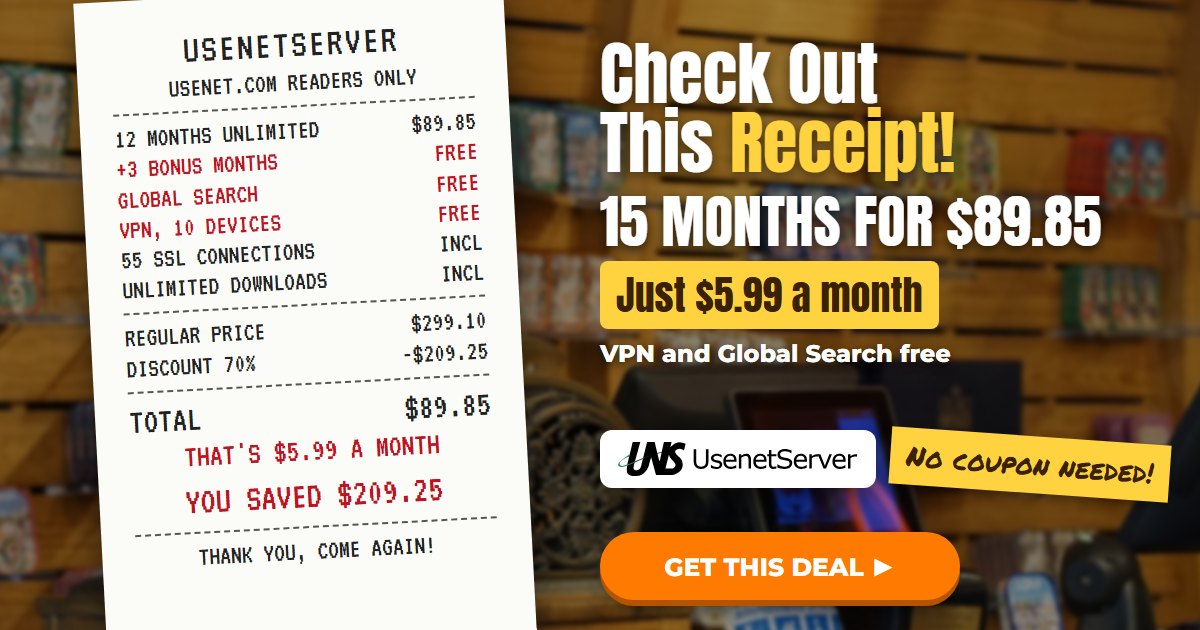
There’s a special deal for Usenet.com visitors, and it comes in two options. The UsenetServer yearly deal is 12 months plus 3 free months for $5.99 a month. That’s 70% off, and it’s $89.85 for all 15 months instead of the regular $299.10. The other option is month to month for $10, down from their usual $14.95.
| 1 MONTH | 12 + 3 FREE MONTHS |
| $10.00/mo | $5.99/mo |
| Unlimited Downloads | Unlimited Downloads |
| 20 SSL Connections | 55 SSL Connections |
| Days Retention | Days Retention |
| Free Global Search | Free Global Search |
| VPN +$4.99 a month | Free VPN Included |
Our UsenetServer Deal
The 12 + 3 month deal is the one we’d get. You pay $89.85 up front, which works out to $5.99 a month, and that includes the 3 free months. You also get 55 connections and the VPN at no extra cost. On UsenetServer’s own site, the yearly plan is $7.95 a month with 50 connections, so our link gets you a lower price and more connections. There’s no coupon code to type in, either. Instead, the price shows up as soon as you click through.
What It Renews At
UsenetServer plans renew automatically for the same length of time. Their terms say you pay the renewal price at that time, so check it in your account before your 15 months are up. You can cancel any time from your control panel, or by emailing billing@usenetserver.com. Your access then keeps going until the end of the time you’ve paid for.
UsenetServer’s Regular Plans
If you go straight to UsenetServer, their own prices are $14.95 for 1 month, $8.95 a month for 3 months, or $7.95 a month for a year. The monthly and 3-month plans have 20 connections, and the VPN is $4.99 a month extra on those. Apart from that, every plan has the same retention, unlimited downloads and Global Search. But our deal beats all three of them on price.
How to Sign Up for UsenetServer
Signing up only takes a couple of minutes. Here’s how it works.
- Go to the UsenetServer deal page and pick the 12 + 3 month deal or the monthly one.
- Enter your details and pay with a card or PayPal.
- Then check your email for your username, password and server details.
- Finally, put those into your newsreader, or log into Global Search, and you’re ready to go.
Your access usually starts as soon as your payment goes through. UsenetServer also puts a small hold on your card when you sign up, and it usually drops off in 5 to 7 business days.
Retention and Completion
Retention is how long a provider keeps posts on its servers. The more days it has, the further back you can go to find older files. UsenetServer runs its own storage network, and their archive grows by another day every single day. The retention number on this page comes straight from UsenetServer and updates itself, so it’s always current. UsenetServer is also one of the few Usenet providers that is actively growing their retention to keep the full Usenet archive.
Does UsenetServer Delete Old Posts?
No. Unlike some services that purge older posts to free up space, you get the full archive with UsenetServer. So when you’re choosing a provider, look for one with a clear retention number, because more retention means better search results. UsenetServer lists their completion at 99.99%, and our own tests have always come back complete. They also swap posts with the other big providers, so new posts from around the world show up on their servers.
Connections and Speed
Our deal gives you 55 connections at once, and the monthly plan gives you 20. Every connection is secured with 256-bit SSL encryption at no extra charge. Also, there are no speed caps and no download limits.
UsenetServer runs its own tier-1 Usenet backbone, and it connects to more than 800 broadband providers around the world. So you get fast downloads no matter where you are. In addition, they have servers in the US and in Europe, and you can pick whichever is closer to you. Just keep in mind that an account is for one person, and only one login session at a time is allowed.
UsenetServer Global Search
Global Search is UsenetServer’s own Usenet search engine, and it’s included with every account. You just log into your UsenetServer account and search by keyword. Then you can narrow things down by group, poster, file size or how old the post is. When you find what you want, add it to your NZB cart and it builds an NZB file for your newsreader. It searches every group across the full retention. However, it doesn’t do wildcards, so type the words you’re looking for instead.
How to Use Global Search
- Log into your UsenetServer account and open Global Search.
- Type in a keyword. It also finds other endings of the same word, so you don’t have to try every version.
- Narrow the results by group, poster, file size or age.
- Add the posts you want to your NZB cart.
- Download the NZB file and open it in your newsreader.
Which Newsreader Should You Use?
UsenetServer doesn’t have its own newsreader, so you’ll use a free or paid one with it. They recommend NZBGet, and SABnzbd, GrabIt and Newsbin all work great too. Just add the server settings below, then open the NZB files you build in Global Search.
UsenetServer Server Settings
First, find your username and password in your welcome email. These are the settings you need for your newsreader.
- Server: news.usenetserver.com
- SSL ports: 563, 443 or 8080
- Regular ports: 119, 20, 23, 25, 3128, 7000, 8000 or 9000
- US server: news-us.usenetserver.com
- Europe server: news-eu.usenetserver.com
- Connections: 55 on our yearly deal, or 20 on the monthly plan
We’d always use SSL on port 563. Port 443 is handy if your internet provider blocks the usual Usenet ports.
Do You Need a VPN With UsenetServer?
No, you don’t need one for Usenet. Your UsenetServer connection is already encrypted with SSL, so what you download stays private between you and them. A VPN covers everything else you do online, like browsing, streaming and email. So it’s a nice extra, and on our yearly deal it’s free.
What’s the UsenetServer VPN Like?
The VPN is PrivadoVPN, and it’s a proper VPN with its own apps, not a browser add-on. It uses WireGuard, OpenVPN and IKEv2. Besides that, it blocks DNS leaks by default. You also get a kill switch and split tunneling, which lets you choose which apps go through it. There are apps for Windows, Mac, iPhone, Android, Fire TV, Android TV and Apple TV. Also, you can use it on 10 devices at once, and you can even share it with your family. Just remember it’s tied to your Usenet plan, so it stops when your account ends. Our UsenetServer VPN review goes into more detail.
Is the VPN Free on Every Plan?
No. It’s free on the yearly plan, but the 1-month and 3-month plans charge $4.99 a month for it. So if the VPN is part of why you’re signing up, the yearly deal is the one to take.
Is There a UsenetServer Free Trial?
UsenetServer used to run a 14-day trial capped at 10 gigs. They replaced it with a 30-day money-back guarantee for new subscribers, which is a better deal for you. Sign up, use it properly for a few weeks, and if you’re not happy, ask for a refund within 30 days. You can reach their support any time, 24/7, by ticket or at support@usenetserver.com.
UsenetServer vs Other Usenet Providers
People often ask us how UsenetServer compares with Newshosting and Easynews. Newshosting’s deal is also $5.99 a month for 15 months, with 100 connections and a newsreader with search built in. Easynews works in your web browser, and its deal is $5.99 a month with 60 connections. UsenetServer is the one to pick if you want Global Search and your own choice of newsreader. If you’re in Europe, Eweka is worth a look too. Our full list of Usenet providers compares them all.
Pros and Cons
Pros: lots of retention that grows every day, 55 connections on our deal, free Global Search, a free VPN on the yearly plan, US and European servers, lots of ways to pay, and 24/7 support.
Cons: no newsreader of its own, the VPN costs extra on the shorter plans, no free trial, and it renews at their price at the time.
Who Should Get It?
UsenetServer is a great fit if you want to search Usenet yourself without paying for an indexer. It’s also good if you already have a favorite newsreader and just want a fast, reliable server. The free VPN makes the yearly deal even better value. But if you’d rather have a newsreader that does everything in one program, Newshosting might suit you better.
UsenetServer FAQs
Is UsenetServer a good Usenet provider?
Yes, it’s our number one pick. You get a lot of retention, 55 connections on our deal, Global Search and a free VPN, all for $5.99 a month.
Does UsenetServer keep logs?
They say they don’t monitor which newsgroups you post to or download from. Their servers do log your IP address and the times you connect.
How do I cancel?
Log into your control panel and cancel from there, or email billing@usenetserver.com. You keep your access until the end of the time you’ve paid for.
Can I share my account?
No, a Usenet account is for one person, and only one login session at a time is allowed. The VPN is different, though, because you can share that with your family.
Do I need an indexer with UsenetServer?
Not really. Global Search lets you search Usenet and build NZB files yourself. Some people still like to use an indexer as well, and our list of the best NZB sites can help you pick one.
How long has UsenetServer been around?
Since 1998, so more than 25 years now. It’s run by UNS Holdings in Winter Park, Florida.
What payment methods can I use?
You can pay with Visa, Mastercard, American Express, Discover, JCB or PayPal. They also take money orders for 3 months of service or more.
Will there be a UsenetServer Black Friday deal?
When the Black Friday deals come out, we’ll post the ones our links can get you on our Usenet Black Friday deals page.
Is UsenetServer Worth It?
Yes. UsenetServer consistently gives the best quality service at the best price in our testing. You get unlimited data and speed from their own tier-1 backbone, plus Global Search and a free VPN on the yearly plan. That’s why it’s our top choice for Usenet access. Get UsenetServer for $5.99 a month, or see how it stacks up on our list of the best Usenet service providers.