

Usenet Crawler is a free NZB indexer that anyone can join, and it’s been around since 2012. The free account covers searching by hand. If you want more, their BFF membership is a one-time contribution of about $20 that works like a lifetime plan. Like any indexer, it only finds the NZB files. To download anything you also need a Usenet provider, and we use UsenetServer, which is 70% off for our readers with 3 free months.
What Is Usenet Crawler?
Usenet Crawler started in 2012 as an alternative to NZBMatrix, and over the years it built up a big library of NZBs. It struggled to cover the cost of running a busy indexer, so it went offline in 2016. Then it came back in March 2019, and it’s still running today at usenet-crawler.com.
If you’re new to Usenet, an indexer is basically a search engine for Usenet posts. It keeps track of what’s on the servers, and when you find something, it gives you an NZB file. Your newsreader then uses that file to download the pieces. Our guide on how to search Usenet explains it in more detail.
Usenet Crawler Free Account and BFF Membership
Joining is free, and free accounts get a limited number of NZB downloads and API calls each day. That’s fine if you search by hand, but it can be tight if you run Sonarr or Radarr. The site is mostly paid for by ads, which are small and don’t get in the way.
To help cover their server costs, they also offer a BFF membership. BFF members get 50,000 API calls and 5,000 NZBs a day, no ads, and NZBVortex integration. The BFF perks are the same whatever amount you give.
Is There a Usenet Crawler Lifetime Plan?
Yes, more or less. The BFF membership is a one-time contribution of about $20, and you don’t pay again every year, so it works like a lifetime plan. However, the price and the offer change with their sales, so check the site before you pay.
Easynews is our top choice among the NZB search options. It’s an all-in-one service with unlimited high-speed Usenet access and its own Usenet search, so you don’t need an indexer or a newsreader. Just log in, type what you want into the search bar and hit enter.
Other features:
- Highest retention rates / largest Usenet archive
- Retention grows daily (no Usenet posts are expired)
- Fast and accurate results
- Easy to use, fully customizable search interface
- No NZBs, indexers, or newsreaders needed
- Works on any device (mobile and desktop)
It also saves you the cost of paying for NZB indexers, since you get unlimited Usenet search with your Easynews account.
Exclusively through Usenet.com: Get 80% Off Easynews + 3 FREE Months on the Yearly Plan – Includes a 30-Day Money-Back Guarantee
How to Register for Usenet Crawler
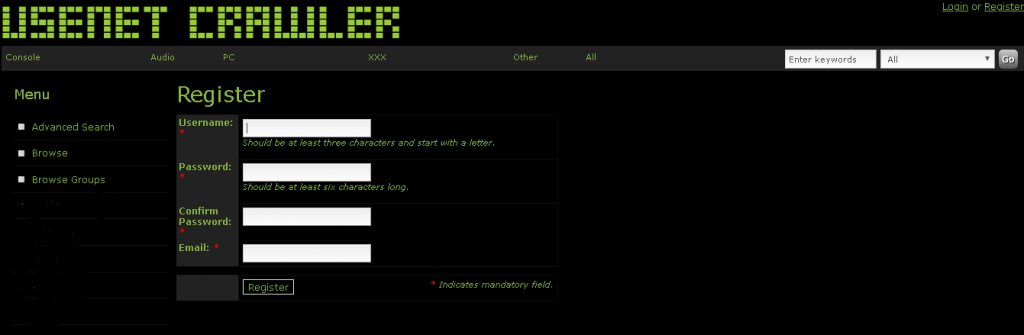
Registration is open, so you don’t need an invite. You pick a username and a password, add your email and fill in a captcha, and that’s it.
Usenet Crawler Login Problems
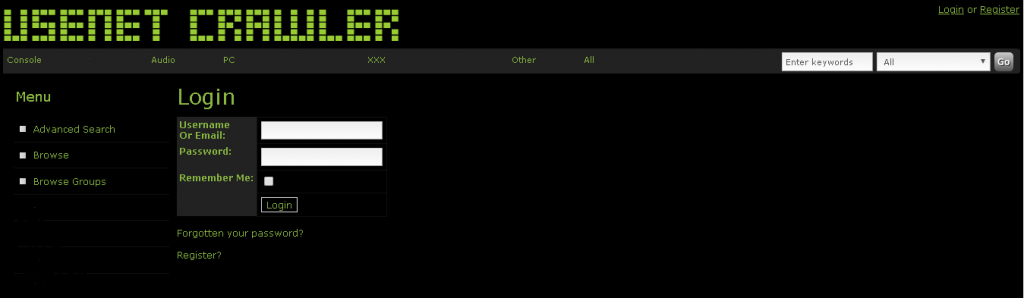
This one catches a lot of people out. Usenet Crawler no longer lets you log in with your username, so you have to use your email address instead. The old login page below still asked for a username or email, which is why so many people get stuck. If you still can’t get in, use the live chat at the bottom right of their site. Give them your username, your email and what’s going wrong.
Using Usenet Crawler With Sonarr, Radarr and SABnzbd
Most people use an indexer through their apps, not the website. Usenet Crawler has a standard Newznab API. You add it to Sonarr or Radarr as a Newznab indexer with your API key, and they search it for you. If you use more than one indexer, NZBHydra2 can search them all at once. Also, keep an eye on the free limits, because your apps can use them up fast. Our SABnzbd review shows how the download side is set up.
Searching on the Website
If you’d rather pick downloads by hand, it works like any search engine. Type in what you want, check the names of the results, and click the NZB link when you find the right one. There are filters to narrow down the results too, so it’s easy to use even if you’re new.
Reliability and Privacy
The site uses SSL, so your internet provider can’t see what you’re looking at on it. Reliability is the weak spot, though. It was offline for about three years, and it still goes down now and then. It’s also better for common posts than older or harder-to-find ones. That’s why we’d use it as a second indexer rather than your only one.
Is Usenet Crawler Worth It?
Yes, especially as a free or cheap second indexer. You can join today, the free account lets you try it for nothing, and the BFF upgrade is a one-time cost. If you’re comparing, it’s worth knowing what NZBgeek costs. Our lists of free NZB indexers and the best NZB sites have the rest.
You’ll Need a Usenet Provider Too
An indexer only finds the NZB files, because the downloading runs through a Usenet provider, which is a separate account. We recommend UsenetServer, and right now it’s 70% off for our readers with 3 free months on the yearly plan, which works out to $5.99 a month. It also comes with a free VPN. You can compare the rest on our best Usenet providers page, or read our UsenetServer review.