
NZBfinder.ws is a community-based NZB forum that came into existence late 2012. And Since Jan. 2013 registration has been opened and the site is free to registered users. They have both free search and VIP accounts.
NZBFinder
NZBFinder.ws specializes in providing the Most Popular NZB. Unlike other Top NZB sites their service is spam and ad free. The minimum file size of 250 MB likewise guarantees that incompletes don’t exist. They go back about 1,100 days, and the indexer refreshes its list at regular intervals. There are a couple of distinctive membership levels at NZBFinder.ws, with the maximum level getting you access to Spotweb and unlimited calls and downloads. The free account allows you to see that NZBFinder.ws is for you.
NZBFinder
Automatically, the NZB Finder indexes Usenet content like other Usenet search engines. This is the users’ community. It will require time to see whether or not NZBFinder.If they do, the user’s remarks make the site far more valuable. You will need a Usenet Provider to go with your NZBFinder. UsenetServer is our choice for your Usenet Service Provider.
Easynews is our top choice among the Best NZB Index Sites 2023. It is a complete all-in-one solution that includes unlimited high-speed Usenet access plus a Usenet search interface with the most accurate Usenet search results. The interface is easy to use — just log into your Easynews account, enter your query into the search bar, and hit enter.
Other features:
- Highest retention rates / largest Usenet archive
- Retention grows daily (no Usenet posts are expired)
- Fast and accurate results
- Easy to use, fully customizable search interface
- No NZBs, indexers, or newsreaders needed
- Can be accessed from any device (mobile and desktop)
This will also save you the hassle and added cost of subscribing to
various NZB indexers since you get unlimited access + unlimited Usenet search with your Easynews account
Exclusively through Usenet.com: Get 3 FREE Months of Easynews – Includes 30 day MBG + Free Upgrade to Unlimited (normally 150GB/mo)
You can utilize NZB Finder for free however there are limitations. You can search the site for free once registered. We tested and the reaction time was good. Paid members (VIP, premium, and elite) get API calls based on your level of support.
Do not mistake a Usenet provider for a newsreader software. Both of which you would download from Usenet. pwnZB will help you to discover what you’re looking for crosswise over a great many newsgroup posts without the requirement for downloading headers.
How to utilize NZB Finder:
Look for your subject of interest. When you find what you’re searching for; click on the name of the post for more details. At that point, you can download the NZB and open the recently made NZB file in your favorite Usenet client to download the substance.
NZBFinder
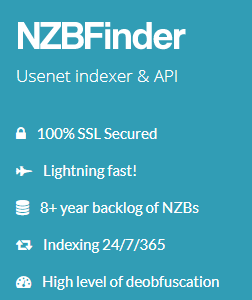
NZBFinder.ws Highlights
- High Quality Video and Audio
- Only sound and top notch video groups crawled
- Indexer runs consistently
- No Ads
- Spotweb for Elite Accounts
- Free Account 25 API Hits/5 Downloads
- VIP Account Four levels, €35/Year for Elite
- Retention – over days of binary
- Invites: Not required
- IRC: No
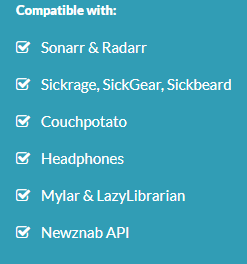
- Integrations: SabNZBD, NZBGet, Sonarr, and so on.
- Privacy: SSL
- Hardware points of interest: Intel Xeon E5-1620@3.7GHz, 64 GB DDR-3, 3x Intel 310 120 GB SSD RAID-5, 1 Gb/s
- Payment Options: Credit cards, Bitcoin, Prepaid Gift Cards
NZBFinder features
Memberships
Registration is for free, and you will be allowed up to 10 API calls and 5 NZB downloads every day. Here’s the scoop on the others:
NZBFinder
- VIP Account – 10 Euros gift: 5,000 NZBs and 5,000 API called p/day.
- Premium – 20 Euros gift: 10,000 NZBs and 10,000 API calls p/day.
- Elite – 35 Euros gift: Unlimited NZBs and unlimited API hits p/day.
API Integrations
The API key is made after the clients fill out RSS form that appears on the account detail page. At the forum, you can make sense of how you can get your API to work with Sonarr. A part of the API combinations you can get included NZBGet, Sonarr, SabNZBD, Couchpotato, and altogether more. Free account holders get a most extreme of three API calls a day. Then again, VIP account holders get unlimited API calls each day.
NZBFinder Public Access NZB Indexes
The computing power behind this Newsnab site is very noteworthy, and also a genuinely substantial library. The site updates every 5 minutes, and with such a small membership slowdowns never happen. We are anticipating that this site will go far once their fan-base begins picking up…
Convenience
Before using this NZB site, you are required to register a free account. In the wake of signing in, you can find the subject you need at the search bar. You would then have the ability to audit the results and click on NZB button to get the NZB to your PC. You can in like manner open it automatically with the Newsreader.
You will find search highlights on the site extremely phenomenal.
Despite the likelihood that you are a first-time user, you won’t experience issues navigating around. Frankly, the download procedure is direct and does no issues. You simply search what you need and download NZB to the browser and afterward open it with your preferred program. With a couple of NZBs through searching, it can’t be difficult to get what you need.
For instance, free users are permitted a maximum of 5 searches each day. Additionally, you can filter the searches as per formats and types and after that sort them by grabs, comments, age, size, views, IMDb rating, and IGN rating.
Security
Stated above, NZBFinder.ws uses SSL security. This is one of the ways they are committed to ensuring your security and privacy. Note that they don’t record your IP addresses and your IP address can’t be accessible for public viewing. Moreover, they need to bother with a valid email address when you join.
In any case, the information posted on the forum is users post public as a considerable amount of it. Everything considered, they are not accountable for what you promptly uncover to people in general. In this way, you are at your risk. Much the same as other NZB indexers, they can’t guarantee the loss, unapproved access, abuse of data that will never happen.
Conclusion
NZBFinder.ws has a few distinctive membership levels, which makes it a pleasant choice for individuals who needn’t bother with the most extensive use of the site. At the extreme level, in any case, you would always have access to Spotweb and unlimited calls and downloads, there are also advantages to the Elite yearly plan. The group selection is restricted to audio and high quality video, however for a few clients that might just be all they require. This is an amazing site where convenience and flexible pricing are concerned. Also consider Our Best NZB Index Sites 2023