

Here are the best Usenet search engine sites we’d use right now, with the quick version in the chart below.
| 1 | Easynews – $5.99/mo, 80% off with 3 free months Search and download in your browser, no newsreader needed. 6,600+ days of retention. Get Easynews |
| 2 | UsenetServer Global Search – $5.99/mo, 12 months plus 3 free Search built into a UsenetServer account, plus full Usenet access. 6,500+ days of retention. Get UsenetServer |
| 3 | BinTube – $10.99/mo Search with thumbnail previews, plus Usenet access in one package. Get BinTube |
| 4 | Binsearch – Free Free web search of Usenet binaries. Search only, so you still need a provider to download. |
| 5 | NZBIndex – Free Free NZB search site, no account needed. Search only, so you still need a provider to download. |
A Usenet search engine lets you search Usenet posts the way you’d search Google, and then download what you find. Some come built into a provider account, like Easynews and UsenetServer, and some are free websites like Binsearch and NZBIndex. Search engines and indexers aren’t quite the same thing, though. If you’re after an indexer account instead, our best NZB sites comparison covers those, and the free NZB sites page lists the ones that cost nothing.
Searching and Downloading Are Two Different Things
A search engine finds things on Usenet, but it doesn’t download them. The downloading happens through a provider account, and that’s the paid part of Usenet. So you end up with two things: something to search with, and somewhere to download from. The best Usenet service providers page covers the second half. The first two picks below give you both in one account, which is why most people start there.
The Best Usenet Search Engine Sites in 2026
These are the five we’d use, starting with the ones that include Usenet access and then the free search sites.
1. Easynews Usenet Search
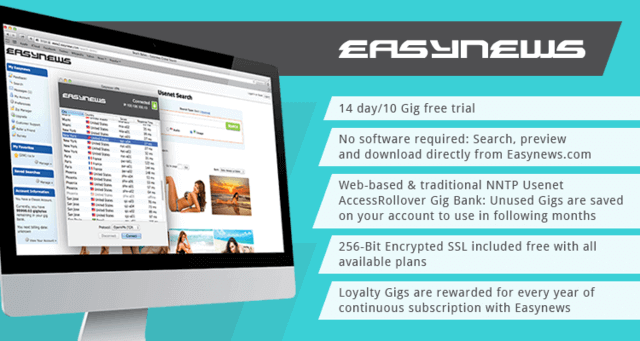
Easynews is the easiest Usenet search engine to use, because the search is built into your account and it all runs in your browser. You don’t need a newsreader or any NZB files. You just type what you want, and then you can narrow it down by subject, file type, poster or newsgroup. Search results come with thumbnail previews, the file size and the age of the post, so you can tell what you’re getting before you download it.
Easynews keeps over 6,600 days of posts, and you get up to 60 connections and a free VPN with the yearly plan. Through our link you get 80% off Easynews plus 3 free months on the yearly plan. Our Easynews review has the rest.
2. UsenetServer Global Search
UsenetServer Global Search comes free with a UsenetServer account, and it searches every newsgroup for any keyword you type. It isn’t as polished as Easynews, but it gets the job done. You can narrow results by newsgroup, poster or age, and you can also build an NZB from what you find. Results show the subject, file size, post age and how many parts the file has.
Their days of retention is a big part of why it’s on this list, because most free search sites only reach back a fraction of that. Right now UsenetServer is 70% off for our readers, 12 months plus 3 free for $5.99 a month, and it comes with a free VPN. See our UsenetServer Global Search guide for more.

3. BinTube
BinTube is a Usenet package with its own search built in. It costs $10.99 a month, and that includes Usenet access plus the BinTube software, which is free for members. The search has plenty of filters, so you can narrow results by age, size, newsgroup or poster. It’s a good fit if you want one program that does the searching and the downloading. Our BinTube review goes through it in more detail.

4. Binsearch
Binsearch is a free Usenet search engine for binary newsgroups, and you don’t need an account. It has a basic search that’s fine for most people, and an advanced search where you can filter by age, size, file type and newsgroup. By default it only searches the most popular groups, so switch to all groups if you can’t find something. It only does the searching, though, so you still need a provider to download. Our Binsearch review has more.

5. NZBIndex
NZBIndex is a free Dutch search site that’s been around for a long time, and it still works well. Also, you don’t need an account. You just search, pick the posts you want and download an NZB file, which your newsreader uses to grab the files from your provider. It’s simple, so it’s a good one to try if you’re new. Our NZBIndex review covers it in more detail. NZBKing used to be on this list, but it’s been offline for months, so we’ve swapped it out.
Which Usenet Search Engine Is Best for You?
It depends on what you want. For searching and downloading in your browser with no setup, go with Easynews. If you’d rather have a regular Usenet account with a search built in, then UsenetServer Global Search or BinTube will do it. But if you already have a provider and just want a free search site, try Binsearch or NZBIndex.
How We Picked Them
We looked at how each one searches, which filters it has, how far back it reaches and what it costs. Search sites come and go, so we check this page and update it when something changes, like NZBKing going offline.
FAQs
What is the best Usenet search engine?
For most people it’s Easynews, because the search and the downloading are in one place. UsenetServer Global Search is a close second, and Binsearch and NZBIndex are the best free ones.
Is there a free Usenet search engine?
Yes. Binsearch and NZBIndex are both free and don’t need an account. You still need a Usenet provider to download what you find, though.
Is Easynews safe?
Yes. Easynews is a well-known Usenet service, all of its plans include SSL, and the yearly plan comes with a VPN.
Which Usenet search engine is best for beginners?
Easynews, because there’s nothing to set up. You log in, search and download. Binsearch and NZBIndex are easy too, but you’ll need a newsreader and a provider to go with them.
Conclusion
A good Usenet search engine saves you a lot of time, because you can search thousands of newsgroups in seconds. Easynews and UsenetServer give you the search and the Usenet access together, and the free sites are handy if you already have a provider. Check our full reviews for more on each one.