
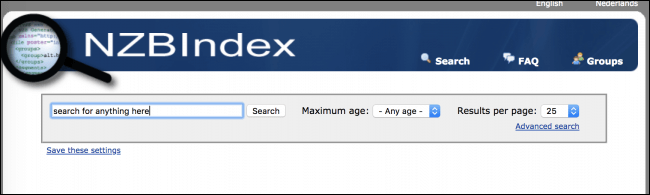
If you want to use Usenet for anything, you’ll need a way to find what you’re looking for. A Usenet search engine like NZBIndex does that. It scans the Usenet groups for posts that match your search and gives you an NZB file. NZBIndex is a free Dutch site at nzbindex.com (see their website). It’s been around a long time and it still works in 2026. You’ll also need a Usenet provider to download with, we use UsenetServer.
Easynews is our top choice among the best NZB search options. It’s an all-in-one service. You get unlimited high-speed Usenet access plus its own search, and the results are really accurate. It’s easy to use. You log into your Easynews account, type in the search bar and hit enter.
Other features:
- Highest retention rates / largest Usenet archive
- Retention grows daily (no Usenet posts are expired)
- Fast and accurate results
- Easy to use, fully customizable search interface
- No NZBs, indexers, or newsreaders needed
- Can be accessed from any device (mobile and desktop)
It also saves you paying for a bunch of NZB indexers. You get unlimited access and unlimited Usenet search with your Easynews account.
Exclusively through Usenet.com: Get 3 FREE Months of Easynews – Includes 30 day MBG + Free Upgrade to Unlimited (normally 150GB/mo)
NZBIndex Features
NZBIndex is really reliable. It’s hardly ever down and in our experience it always comes back with results, unless there’s just nothing there. By default it searches every group it indexes, but you can pick just the ones you want. That makes searches faster and cuts out a lot of junk. You can also hide cross-posts, those are posts that went to more than one group. To download, click any result to get its NZB. Or tick the boxes next to a few results and click download selected, and you get one NZB with all of them in it.
The filters are good for narrowing things down. You can search by age, file size, poster and what’s in the NFO. You can also type ‘-keyword’ to leave out results with that word, or ‘keyword 1 | keyword 2’ to get results with either one. If you want to keep an eye on a search, there’s an RSS feed for it. And you can choose how many results show on each page.
If you see something that breaks copyright or shouldn’t be there, you can report it. Select the results and click the ‘Notice and Takedown’ button above them. You fill in a form, and once your info is checked they take the results down.
Is NZBIndex Easy to Use?
This is where NZBIndex really shines. It doesn’t have as many features as the paid indexers, but it’s really simple to use. You can browse a group just by clicking its name. For a basic search you type what you want and hit enter, and there are advanced settings if you need them. You don’t have to register either, anyone can use it. That makes it a great pick for beginners, their motto is ‘We index, you search’. If you like this kind of site, Binsearch works the same way.
Newsgroups and Retention
NZBIndex covers a lot of groups, so if what you want is on Usenet there’s a good chance you’ll find it. How far back it goes depends on the group, and we’ve seen different numbers quoted, so just search and see what comes up. Your provider has to still have the files too, and that’s where the provider’s retention matters.
Is NZBIndex Free?
Everything on NZBIndex is free. There’s no catch as long as you don’t mind ads, that’s how the site pays for itself. You don’t have to register to use it.
API Integrations
The big downside of a search site like this is there’s no API, the way newznab indexers have. So you can’t really hook it up to Sonarr or Radarr. If that’s how you plan to use Usenet, you’re better off with one of the indexers on our best NZB sites list. You can sort of work around it with NZBHydra2, but it won’t work as well as a real API.
Types of Membership
There’s only one kind of account and it’s free for everyone. The trade off is no API, and it can’t decode obfuscated posts. Those are posts with names scrambled on purpose, so NZBIndex won’t find all of them. The paid indexers are also better at filtering out viruses and spam, because they have more resources to throw at it. But if you’re just starting out a lot of that won’t matter much, and NZBIndex is a great place to start.
Security
NZBIndex runs over SSL so your searches are encrypted, and that’s really all you need from a search site. If you want more privacy, look at getting a VPN. You’ll also need a Usenet provider to download what you find, we recommend UsenetServer.
Conclusion
NZBIndex is a good way to search Usenet. It’s quick, easy to use and completely free. If you’re new to Usenet or you don’t use it a lot, it might be all you need. If you want automation or better results, have a look at the paid indexers.